Nexus Operations
Temporal Nexus is now Generally Available for Temporal Cloud and self-hosted deployments.
Nexus Operations can be synchronous or asynchronous. Unlike a traditional RPC, an asynchronous Nexus Operation has an operation token that can be used to re-attach to a long-running Operation backed by a Workflow. An Operation's lifecycle spans scheduling, reliable delivery with retries, handler execution, and result or callback completion.
SDK support
- Go | Java | Python | TypeScript | .NET
Caller side: A caller Workflow executes a Nexus Operation through a Nexus Endpoint using the Temporal SDK.
Handler side: Nexus Services and their Operations are registered with a Worker that polls the Endpoint's target Task Queue. Operations are defined using SDK builder functions:
- New-Workflow-Run-Operation - Start a Workflow as an asynchronous Operation.
- New-Sync-Operation - Run a synchronous Operation: invoke a Query, Signal, or Update, or execute other reliable code using the Temporal SDK Client.
Nexus Operation lifecycle
When a caller Workflow executes a Nexus Operation, the command is atomically handed off to the Nexus Machinery. The Machinery ensures at-least-once execution with automatic retries and reliable result delivery.
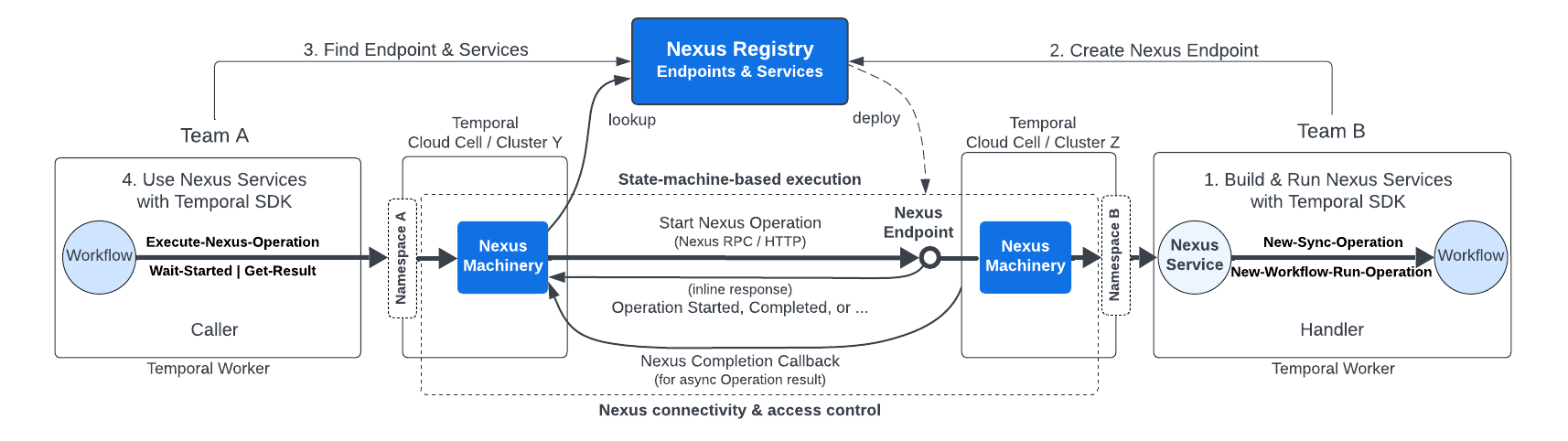
Nexus Overview
Synchronous Operation lifecycle
Synchronous Operations must complete within the 10-second handler deadline, as measured from the caller's Nexus Machinery.
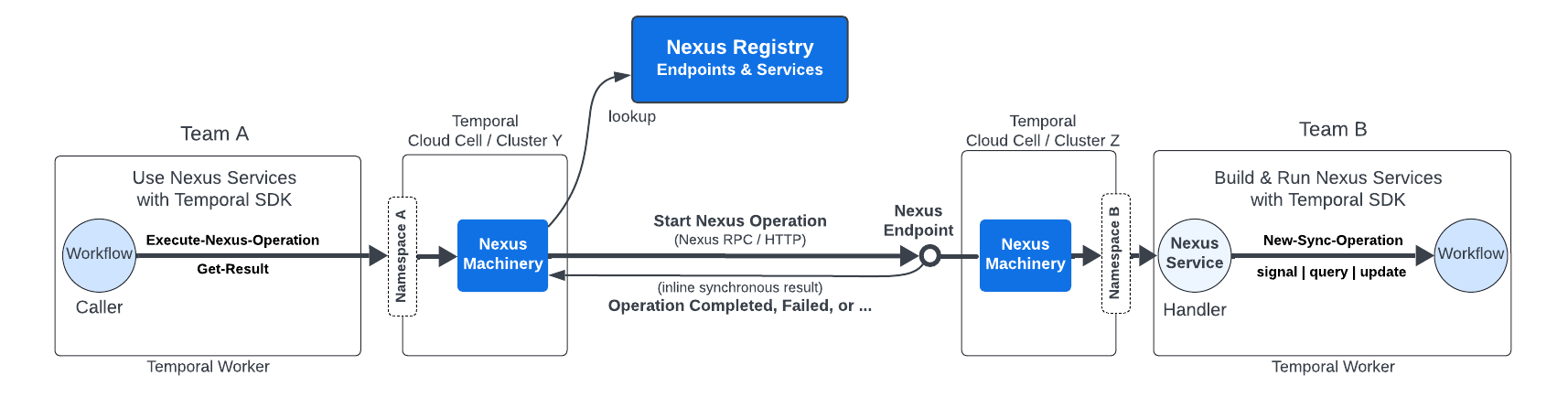
Nexus Sync Operation Lifecycle
Lifecycle for a synchronous Operation (for example, to Signal, Query, or Update a Workflow, or to run other reliable code):
- Caller Workflow executes a Nexus Operation.
- Caller Worker issues a ScheduleNexusOperation command.
- Caller Namespace records a NexusOperationScheduled event.
- Caller Nexus Machinery sends the start request.
- Handler Nexus Machinery sync-matches the request to a handler Worker.
- Handler Worker receives a Nexus Task by polling the Endpoint's target Task Queue.
- Handler processes the task using New-Sync-Operation.
- Handler responds with the Operation result.
- Caller Namespace records a Completed or Failed event.
- Caller Worker polls for a Workflow Task.
- Caller Workflow receives the result.
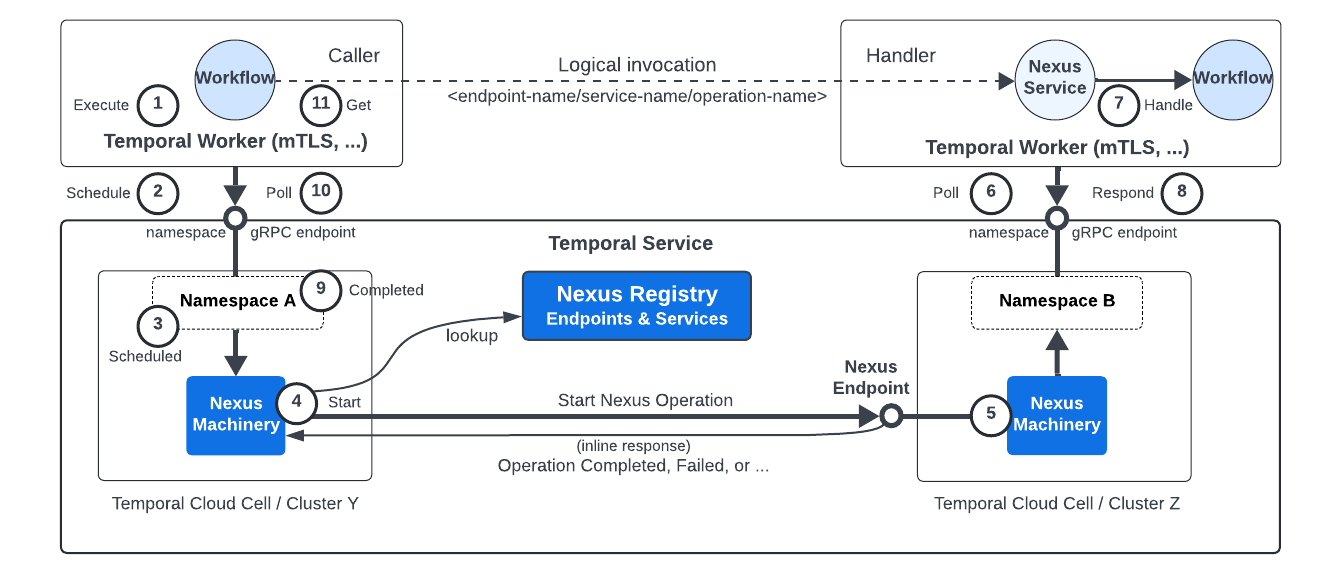
Nexus
Stay within the request deadline to avoid timeouts. Timed-out handlers are retried until the Operation's Schedule-to-Close timeout is exceeded.
Asynchronous Operation lifecycle
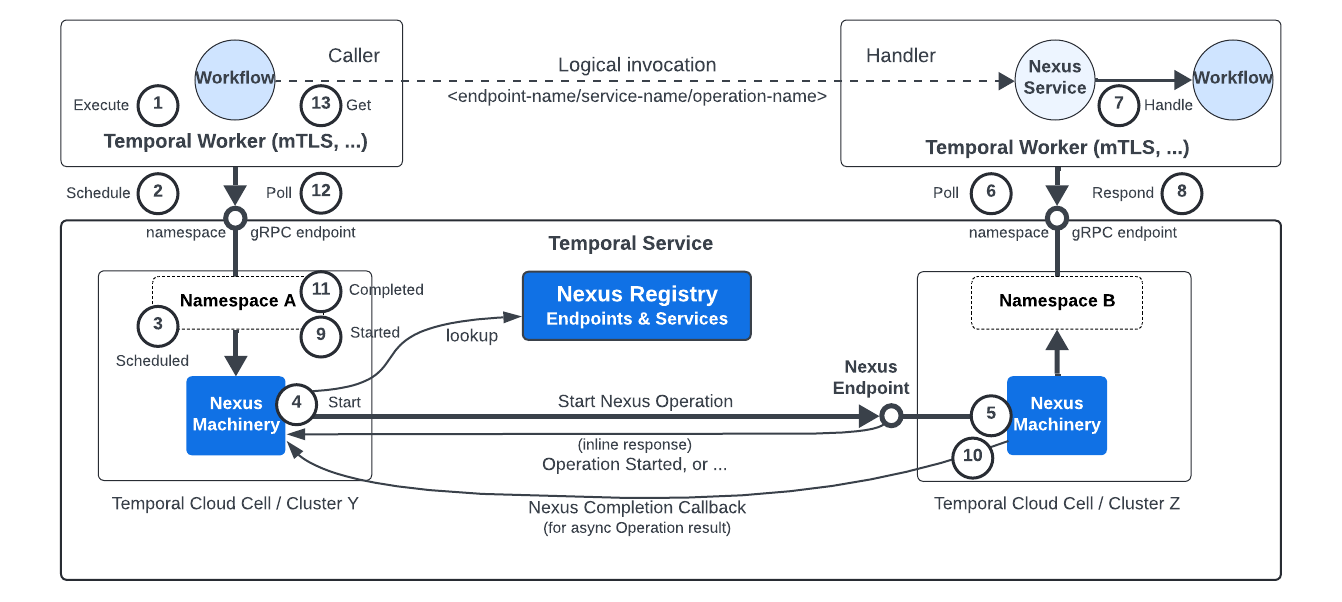
Asynchronous Operations can run up to 60 days (the maximum Schedule-to-Close timeout in Temporal Cloud). Differences from the synchronous lifecycle are in bold.
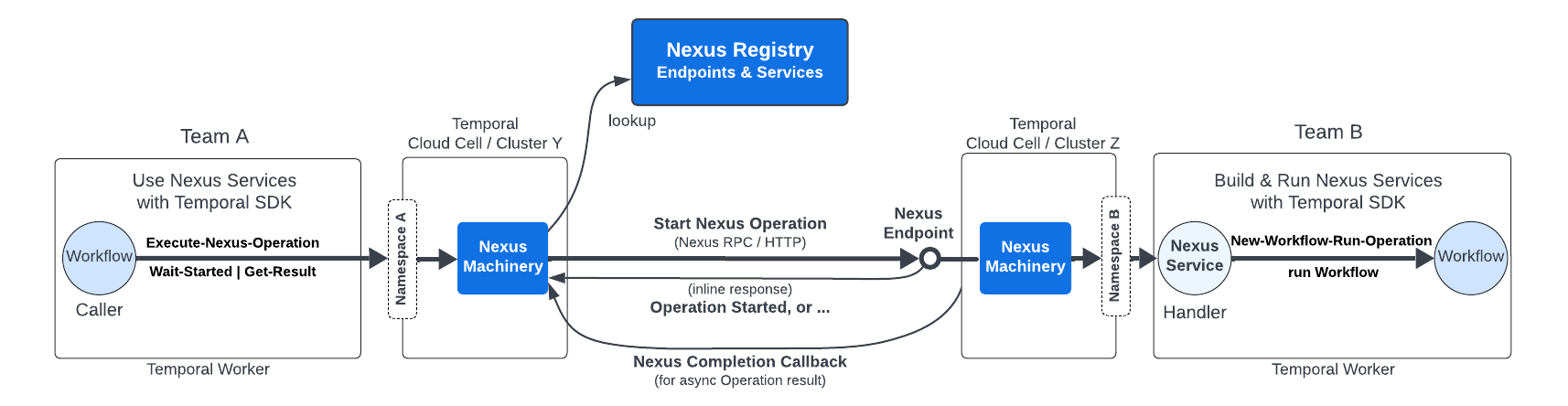
Nexus Async Operation Lifecycle
- Caller Workflow executes a Nexus Operation.
- Caller Worker issues a ScheduleNexusOperation command.
- Caller Namespace records a NexusOperationScheduled event.
- Caller Nexus Machinery sends the start request.
- Handler Nexus Machinery sync-matches the request to a handler Worker.
- Handler Worker receives a Nexus Task by polling the Endpoint's target Task Queue.
- Handler processes the task using New-Workflow-Run-Operation.
- Handler responds with the start Operation response.
- Caller Namespace records a NexusOperationStarted event.
- Handler Workflow completes and a Nexus Completion Callback is delivered to the caller's Nexus Machinery.
- Caller Namespace records a Completed or Failed event.
- Caller Worker polls for a Workflow Task.
- Caller Workflow receives the result.
Nexus
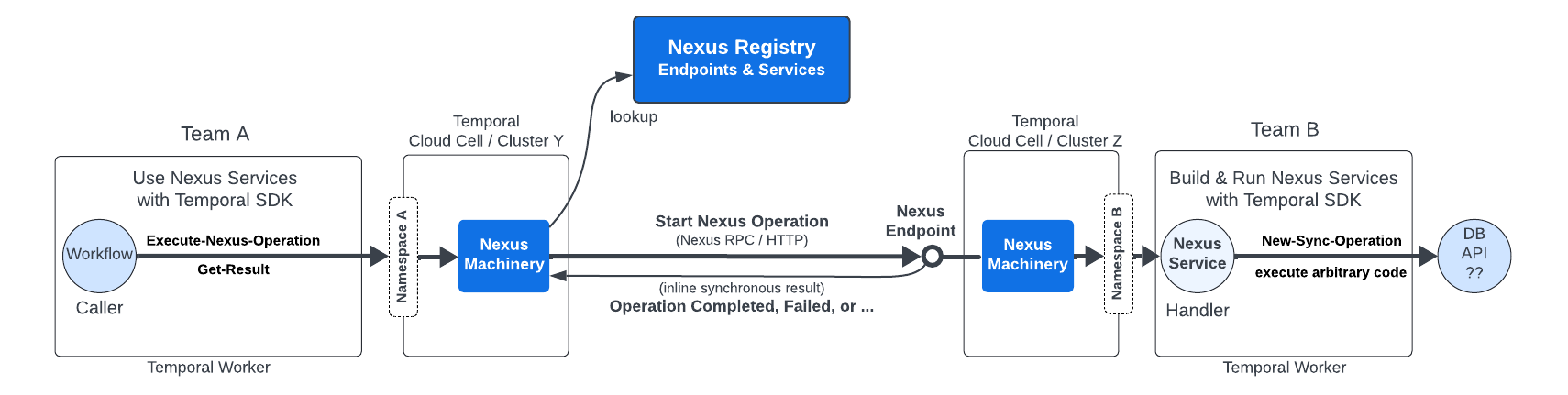
Executing code from a synchronous handler
Synchronous handlers can execute code directly but must complete within the handler deadline. Use the Temporal SDK Client to invoke Signals, Queries, Updates, or other reliable code.
Use async Operations for long-running work. Repeated sync handler failures can trip the circuit breaker, blocking all Operations from that caller to the Endpoint.
Nexus Operations with Arbitrary Code
System interactions
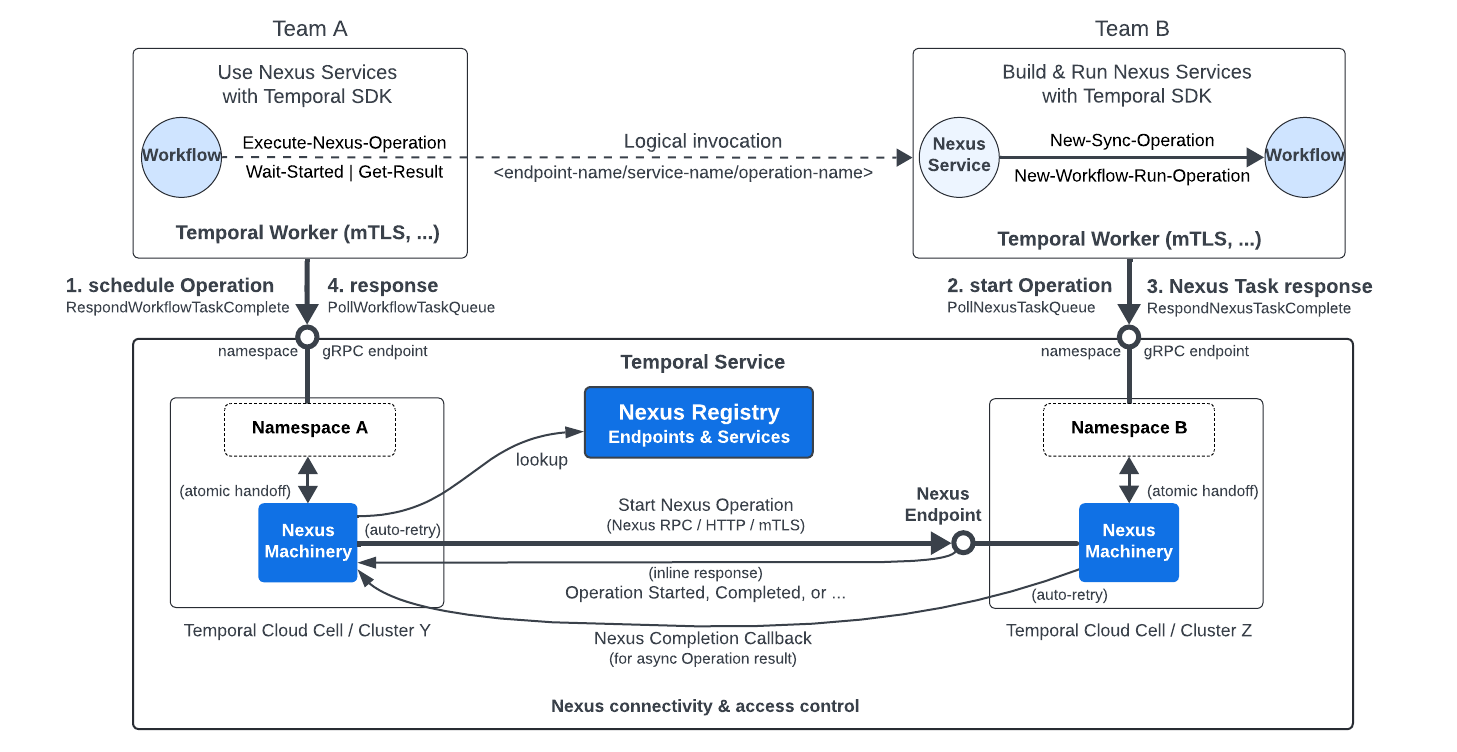
Nexus uses the same queue-based Worker architecture as the rest of Temporal. Workers interact with their Namespace gRPC endpoint. Nexus Machinery on both sides handles cross-Namespace communication.
Nexus Queue-based Worker Architecture
At a high level, when a caller Workflow executes a Nexus Operation:
- The caller Worker schedules the Operation with a ScheduleNexusOperation command, atomically handing off execution to the caller's Nexus Machinery.
- The handler Worker receives a Nexus Task by polling the Endpoint's target Task Queue.
- The handler processes the task and returns the result (synchronous) or an Operation token (asynchronous).
- The caller's Nexus Machinery records a NexusOperation event (Started, Completed, Failed, Canceled, or TimedOut) in the caller's Workflow History.
Automatic retries
Once the caller Workflow schedules an Operation with the caller's Temporal Service, the caller's Nexus Machinery keeps trying to start the Operation. If a retryable Nexus error is returned the Nexus Machinery will retry until the Nexus Operation's Schedule-to-Start timeout or Schedule-to-close timeout is exceeded.
For example, if a Nexus handler returns a retryable error, or an upstream timeout is encountered by the caller, the Nexus request will be retried up to the default Retry Policy's max attempts and expiration interval.
This differs from Activity and Workflow error handling. See errors in Activities and non-retryable errors.
To control retry behavior, return a non-retryable Nexus error. See errors in Nexus handlers.
Timeouts
Nexus Operations support three types of timeouts that control how long the caller is willing to wait at different stages of the Operation lifecycle. These timeouts are set by the caller when scheduling the Operation.
Schedule-to-Close timeout
The Schedule-to-Close timeout limits the total duration from when the Operation is scheduled to when it completes. This is the overall timeout for the entire Operation. The Nexus Machinery automatically retries failed requests internally until this timeout is exceeded, at which point the Operation fails with a NexusOperationTimedOut event.
This timeout covers the full Nexus Operation lifecycle. Asynchronous Operations are scheduled, started, and completed. Synchronous Operations don't have an intermediate started state because they complete as part of the start request.
In Temporal Cloud, the maximum Schedule-to-Close timeout is 60 days.
Schedule-to-Start timeout
The Schedule-to-Start timeout limits how long the caller is willing to wait for the Operation to be started (or completed, if synchronous) by the handler.
If the Operation is not started within this timeout, it fails with TIMEOUT_TYPE_SCHEDULE_TO_START.
If not set or set to zero, no Schedule-to-Start timeout is enforced.
The Schedule-to-Start timeout requires Temporal Server version 1.31.0 or later.
Start-to-Close timeout
The Start-to-Close timeout limits how long the caller is willing to wait for an asynchronous Operation to complete after it has been started.
If the Operation does not complete within this timeout after starting, it fails with TIMEOUT_TYPE_START_TO_CLOSE.
This timeout only applies to asynchronous Operations. Synchronous Operations ignore this timeout because they complete as part of the start request.
If not set or set to zero, no Start-to-Close timeout is enforced.
The Start-to-Close timeout requires Temporal Server version 1.31.0 or later.
Circuit breaking
Nexus implements circuit breaking per caller-Namespace/Endpoint pair ("destination pair"). Each destination pair trips and resets independently. By default, the circuit breaker activates after 5 consecutive retryable errors.
After tripping, the circuit breaker enters the open state and stops sending requests. After 60 seconds, it transitions to half-open, allowing a single probe request. If the probe succeeds, the circuit breaker returns to closed (normal operation). If it fails, the circuit breaker returns to open for another 60 seconds.
Note that worker availability affects the circuit breaker as well. If no workers are polling the handler task queue — due to a deployment issue, crash, or scale-down — Nexus requests will time out. Consecutive timeouts count as retryable errors and will trip the circuit breaker just as application-level errors do. Ensure handler workers maintain sufficient availability to avoid unintended circuit breaker trips.
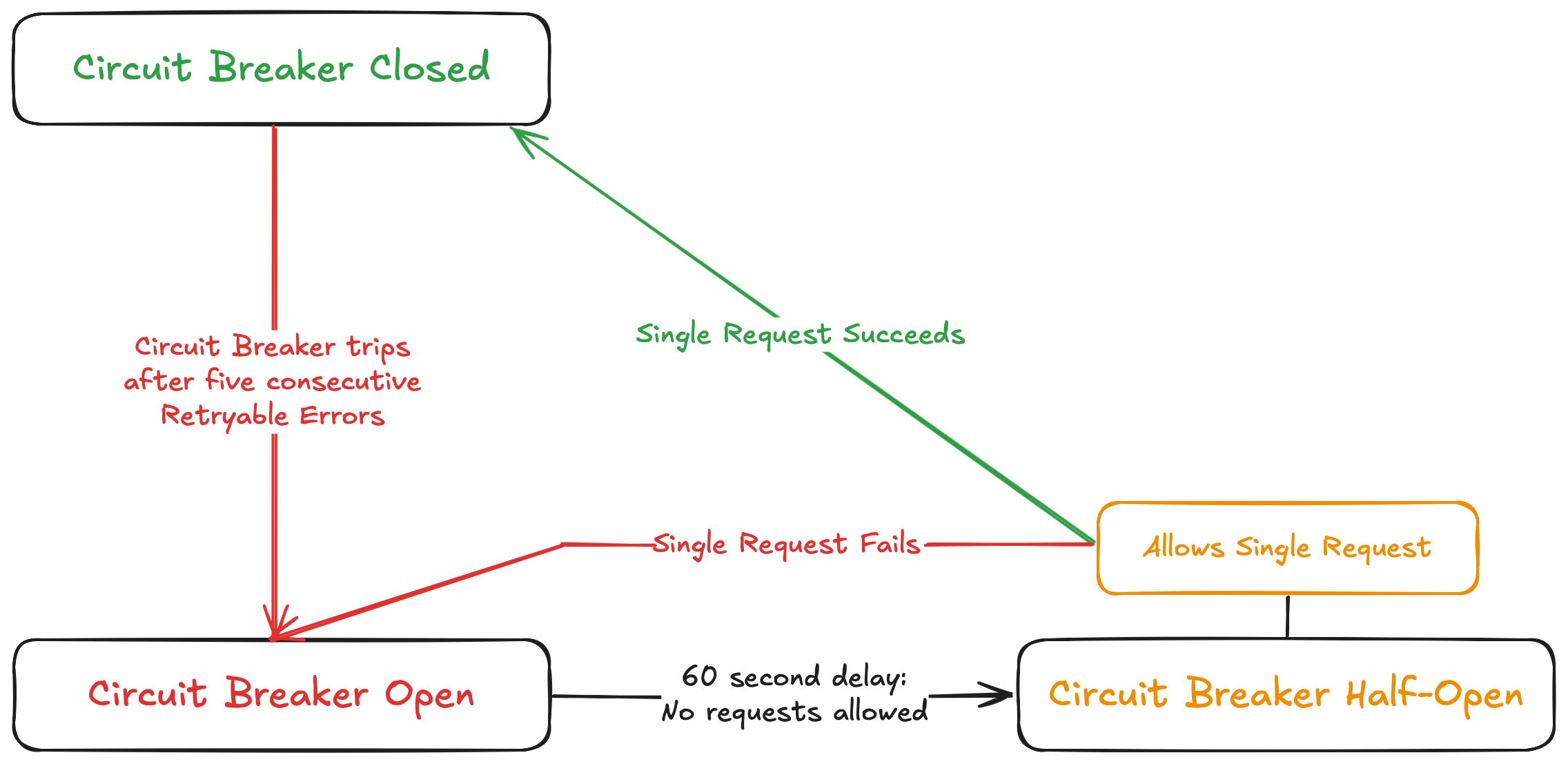
Flow chart showing the states of the Temporal Nexus Circuit Breaker
Circuit breaker state surfaces in Pending Nexus Operations and Pending Callbacks.
Check it in the UI, CLI, or DescribeWorkflowExecution API.
When open, pending Operations show a Blocked state with a BlockedReason:
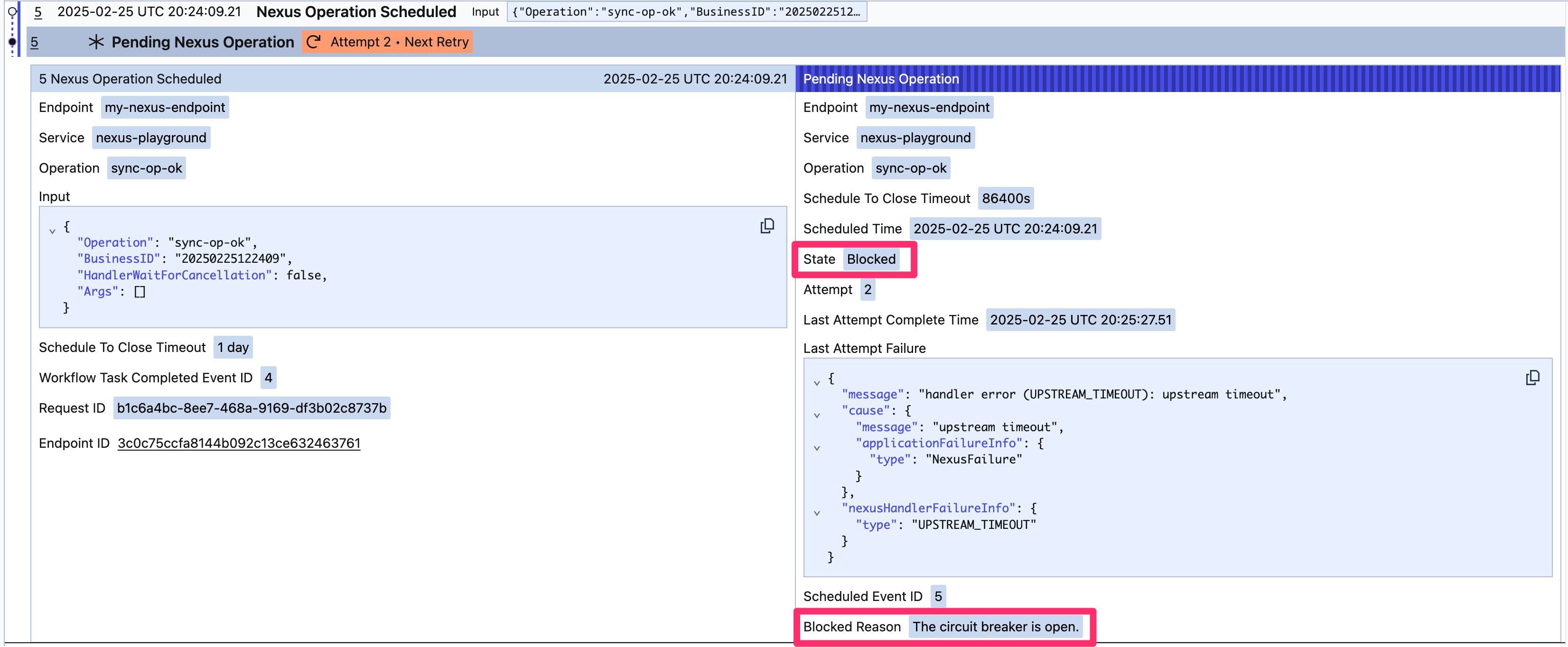
Circuit Breaking
Different Operations within the same destination pair contribute to the trip count. A given Operation may have fewer than 5 attempts when the circuit breaker opens.
From the CLI:
temporal workflow describe -w my-workflow-id
Pending Nexus Operations: 1

  Endpoint                 my-nexus-endpoint
  Service                  nexus-playground
  Operation                sync-op-ok
  State                    Blocked
  Attempt                  1
  LastAttemptFailure       {"message":"handler error (UPSTREAM_TIMEOUT): upstream timeout",...}
  BlockedReason            The circuit breaker is open.
Cancellation requests surface the same pattern with CancelationState: Blocked and CancelationBlockedReason.
Execution Info:
  WorkflowId            my-workflow-id
  ...

Pending Activities: 0
Pending Child Workflows: 0
Pending Nexus Operations: 1

  Endpoint                            my-nexus-endpoint
  Service                             nexus-playground
  Operation                           async-op-workflow-wait-for-cancel
  OperationToken                      eyJ2IjowLCJ0IjoxLCJucyI6Im5zIiwid2lkIjoidyJ
  State                               Started
  Attempt                             1
  ScheduleToCloseTimeout              1d 0h 0m 0s
  LastAttemptCompleteTime             51 seconds ago
  CancelationState                    Blocked
  CancelationAttempt                  5
  CancelationRequestedTime            37 seconds ago
  CancelationLastAttemptCompleteTime  27 seconds ago
  CancelationLastAttemptFailure       {"message":"handler error (UPSTREAM_TIMEOUT): upstream timeout","cause":{"message":"upstream timeout","applicationFailureInfo":{"type":"NexusFailure"}},"applicationFailureInfo":{"type":"NexusHandlerError"}}
  CancelationBlockedReason            The circuit breaker is open.
Execution semantics
At-least-once execution semantics and idempotency
The Nexus Machinery provides reliable execution with at-least-once execution semantics for a Nexus Operation, until the caller's Schedule-to-Close timeout is exceeded, at which time the overall Nexus Operation times out. The Machinery retries on handler timeouts or retryable errors, so a handler may be invoked multiple times for the same Operation.
Nexus Operation handlers should be idempotent, similar to Activities. Not strictly required in all cases, but highly recommended.
Exactly-once execution semantics
To upgrade to exactly-once, back your Operation with a Workflow that uses a WorkflowIDReusePolicy of RejectDuplicates. This allows only one Workflow Execution per Workflow ID within a Namespace for the Retention Period.
Cancelation
Cancelling a caller Workflow automatically propagates to all pending Nexus Operations and their underlying handler Workflows. A canceled handler Workflow reports a Canceled Failure to the caller.
Termination
Terminating a caller Workflow abandons all pending Nexus Operations. Unlike cancellation, no cancel request is sent to the handler Namespace, so handler Workflows continue running indefinitely, consuming resources until they time out or are manually stopped. Because the handler runs in a separate Namespace, it has no signal that the caller is gone, making orphaned Operations difficult to detect and correlate. If the Nexus Operation was part of a multi-step process, termination also leaves no opportunity to run compensation logic, potentially leaving the system in a partially completed state. Prefer cancellation when possible.
Versioning
Task Routing is the simplest way to version Nexus service code.
For backward-incompatible changes, use a different Service name and Task Queue (for example, prod.payments.v2).
Callers migrate to the new version on their own deployment schedule.
Attaching multiple Nexus callers to a handler Workflow
Using a Conflict-Policy of Use-Existing with New-Workflow-Run-Operation is in Public Preview.
Operations started with New-Workflow-Run-Operation automatically attach a completion Callback to the handler Workflow. Additional callers can attach to the same handler Workflow using a Conflict-Policy of Use-Existing.
Each handler Workflow has a Callback limit (configurable for self-hosted, see Cloud limits for Temporal Cloud). Callers that exceed the limit receive an error.
When a handler Workflow uses Continue-As-New, existing completion Callbacks are copied to the new Execution.
The previous Execution's Callbacks remain in Standby state indefinitely.